
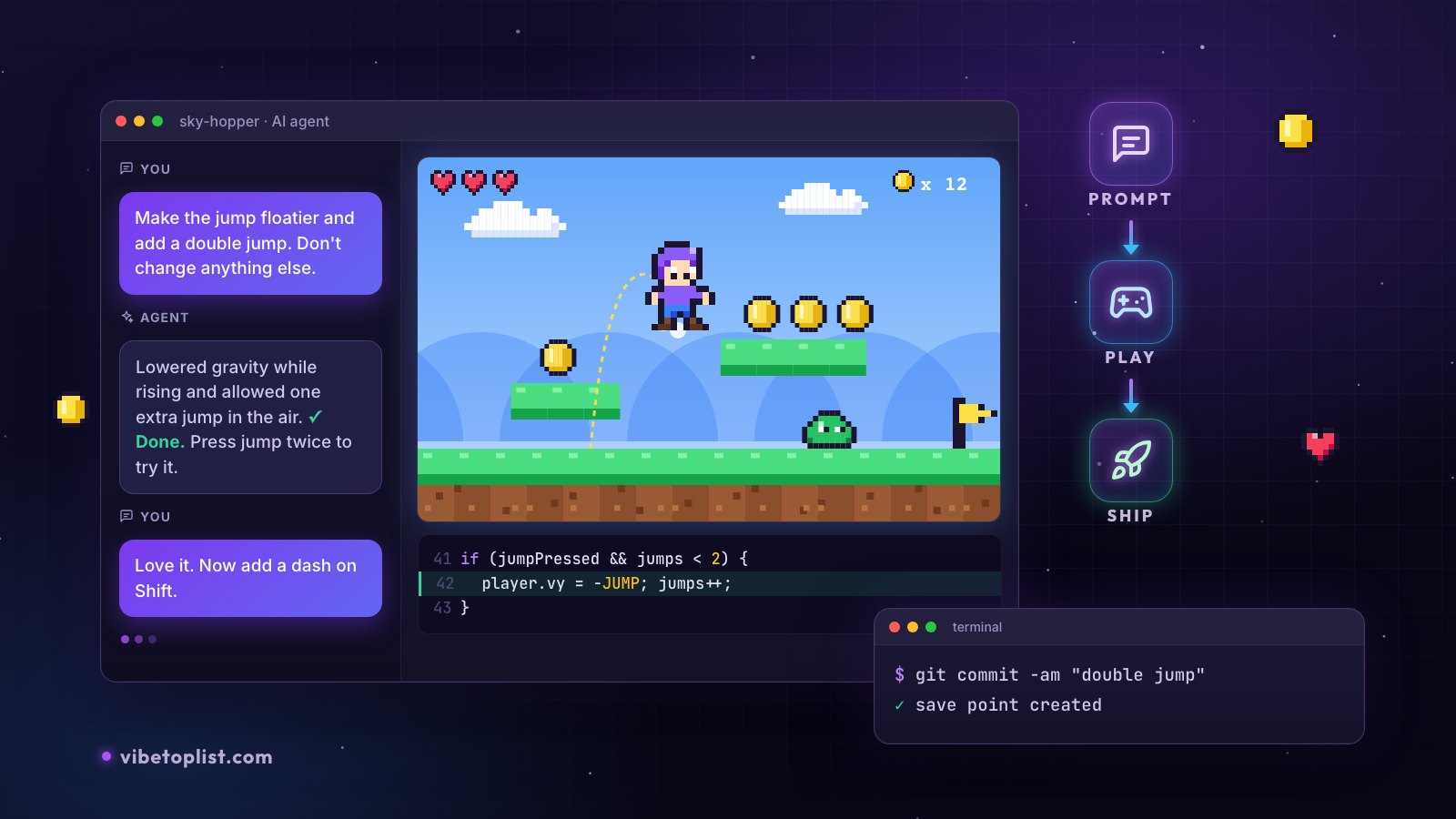
Vibe Coding in 2026: A Practical Guide
Vibe coding means building software by describing what you want in plain language and letting an AI write the code. In 2026 that no longer happens in a chat window alone: coding agents plan the work, edit several files at once, run your game and read its error messages before they hand it back. Building something has never been faster. Neither has building something that falls apart.
This guide is about the part in between: how to work so that what you build keeps working, stays safe and reaches players. New to the term? Start with our explainer, What is vibe coding?, and come back here for the practical side.
Every fact below links to its source and was checked in October 2026. The numbers about games come from VibeTopList's own listings.
What changed since the 2025 hype
Andrej Karpathy coined the term on February 2, 2025: "There's a new kind of coding I call 'vibe coding', where you fully give in to the vibes, embrace exponentials, and forget that the code even exists." Twenty months later, five things are different.
- It went mainstream. Collins named "vibe coding" its Word of the Year 2025. The game jam that grew up around it is now the Cursor Vibe Jam, and its 2026 rules said "at least 90% of the code has to be written by AI."
- The tools became agents. Instead of suggesting the next line, they take a whole task, change several files, run commands and tests, and report back. In Stack Overflow's 2026 Developer Survey, coding assistants and agents were developers' most common use of AI, and the most used coding agents were Claude Code (66%) and GitHub Copilot (59%). Karpathy himself now suggests a new name for the careful, professional version: "agentic engineering".
- The market moves fast. SpaceX agreed to buy Cursor in June 2026, Windsurf became Devin Desktop, and Google moved Gemini CLI's individual users to its new Antigravity CLI. Tools come and go, so keep your code somewhere you control.
- Security did not keep up. In Veracode's 2026 tests, roughly 44% of AI coding tasks introduced a risky security flaw, barely better than a year earlier. Real incidents followed. Moltbook, a site its founder built without writing "a single line of code", exposed 1.5 million API tokens and 35,000 email addresses through a database key in its JavaScript. And an AI agent on Replit deleted a user's production database during a code freeze (it was later restored from a rollback).
- Speed is real, but not automatic. A 2025 METR study found experienced developers took 19% longer on their own projects when allowed AI tools. METR's February 2026 update says developers are likely sped up now, while calling its new data an unreliable signal. Our reading: AI helps most on small, new projects like a browser game, and needs more discipline as a project grows.
What we see in 87 vibe-coded games
VibeTopList lists games made with AI. When makers add a game, they choose how it was built and how far along it is. Here is what the 87 games listed between May 17 and October 18, 2026 look like.
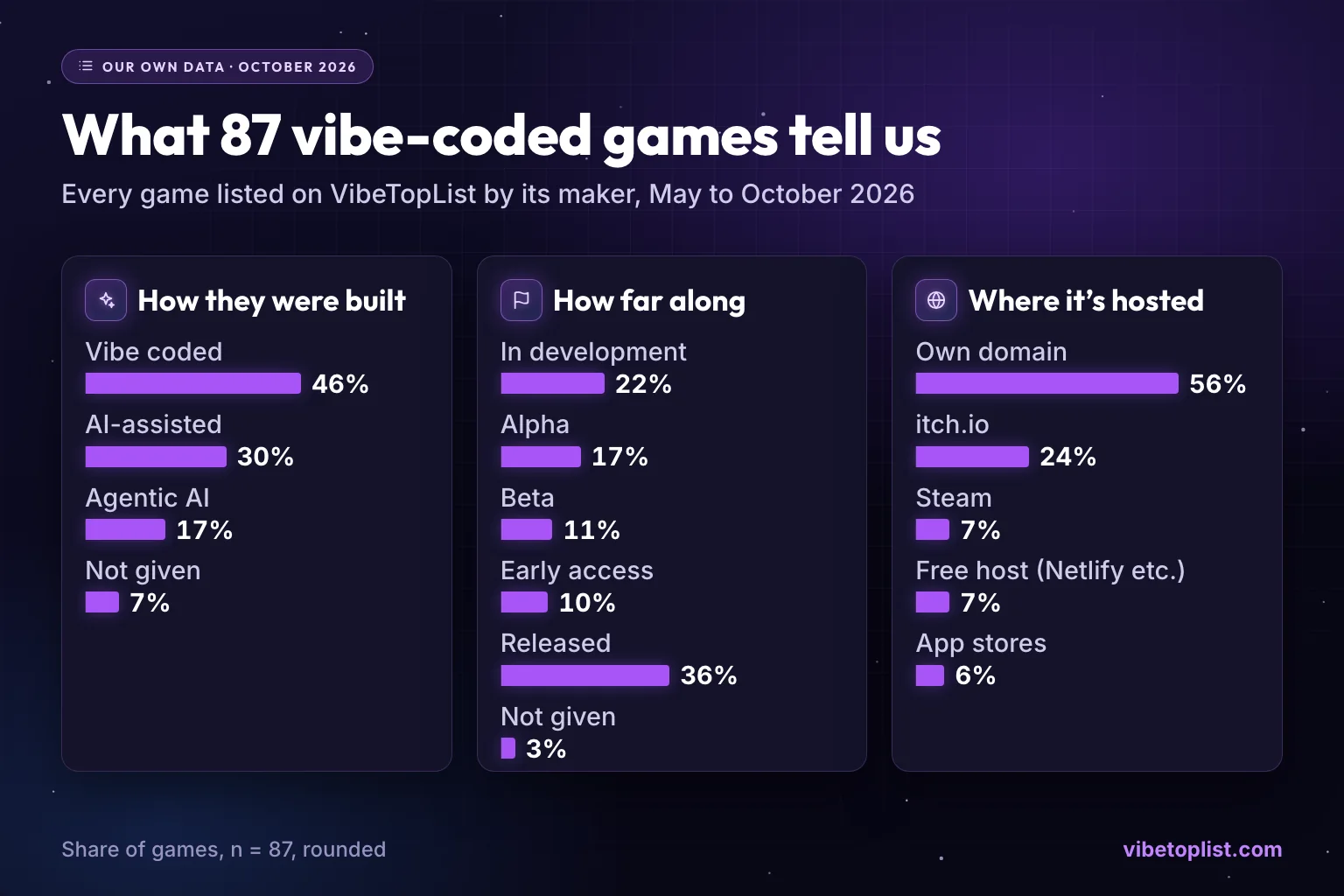
Share of the 87 games listed by their makers between May and October 2026. Build method and stage are the makers' own labels.
- "Vibe-coded" is a spectrum. 46% of makers call their game vibe coded, 30% AI-assisted and 17% agentic AI. The other 7% didn't say.
- Many ship, many are still cooking. 36% are released. Most of the rest are in development (22%), alpha (17%), beta (11%) or early access (10%).
- Most run on their own site. 56% are on their own domain, 24% on itch.io, 7% on Steam, 7% on a free hosting subdomain such as Netlify or Vercel, and 6% in app stores.
- Strategy, RPG, idle, puzzle and multiplayer games make up about half of the list.
- Presentation is the easy win. 31% of these games have no screenshots, 67% have no trailer and 32% describe the game in 50 words or fewer.
Step 1: Pick your lane
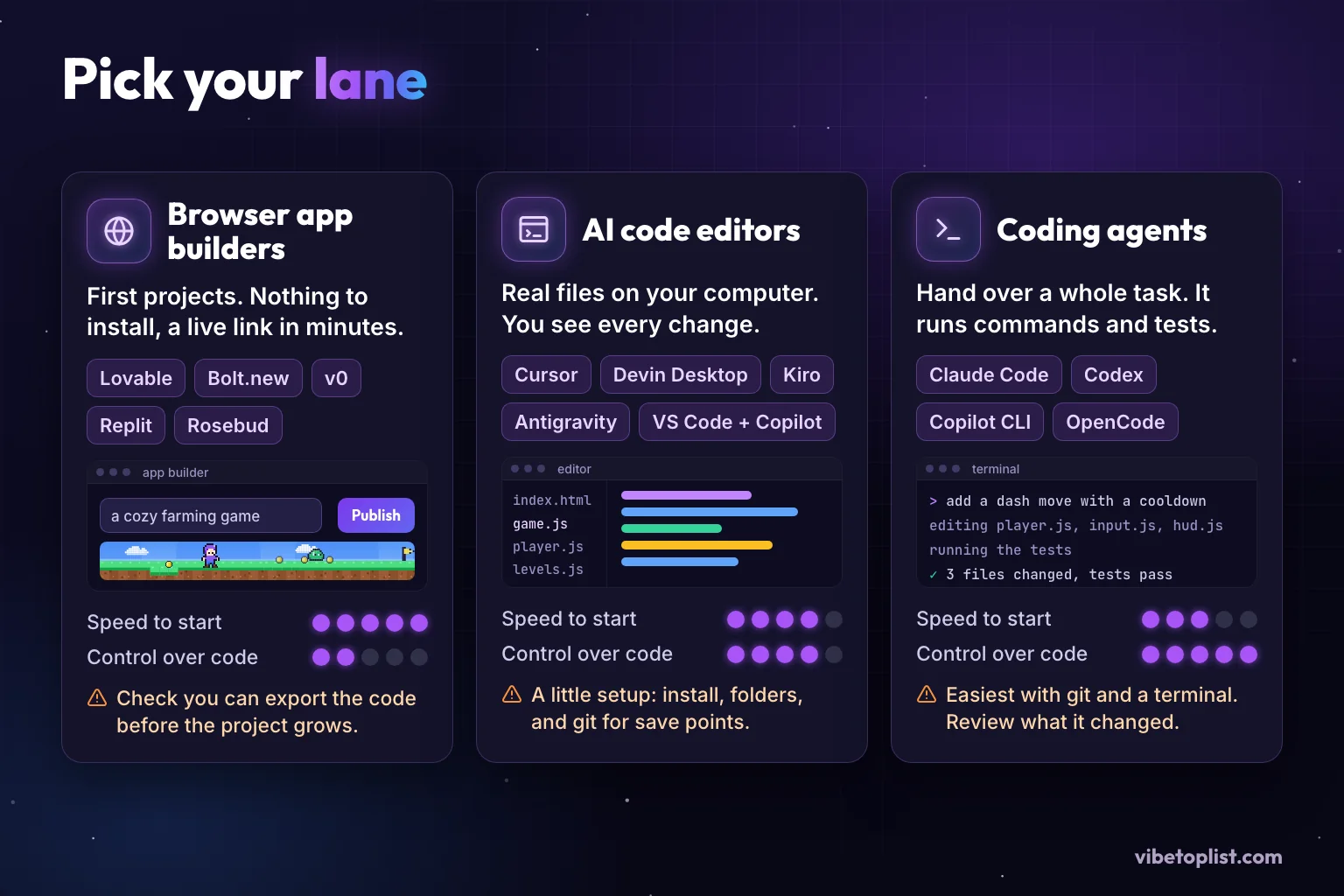
There are three kinds of tools. The right one depends on how much of the code you want to see.
Browser app builders
Lovable, Bolt.new, v0, Replit and Google AI Studio turn a description into a running app with a link, hosting included. Rosebud does the same for games. It is the fastest start and there is nothing to install. The catch: you see less of the code, and as a project grows, each fix can start breaking something else. Check early that you can export your code or sync it to GitHub.
AI code editors
Cursor, Devin Desktop (formerly Windsurf), Kiro, Google Antigravity and VS Code with GitHub Copilot put the AI inside a code editor on your own computer. You see every file and every change, which makes it easier to learn what your game is made of. It takes a little setup: install the editor, make a project folder and turn on git for save points.
Coding agents
Claude Code, OpenAI Codex, GitHub Copilot CLI and the open-source OpenCode take a whole task, work through it, run commands and tests, and report back. Most can also run inside an editor or in the cloud. They are the strongest option for bigger changes and the most comfortable if you already use git and a terminal.
Which one? If you have never written code, start in a browser builder and move the project into an editor once it outgrows it. If you can read code, use an editor or an agent with git from day one. Most of these tools have a free tier, and paid plans for one person typically cost $10 to $30 a month (October 2026; prices change often). For a closer look at individual tools, see Best AI Game-Building Tools in 2026.
Step 2: Set up before your first prompt
Fifteen minutes of setup saves a weekend of confusion.
- Write a one-paragraph brief. What does the player do every ten seconds? What are the controls? How should it look and sound? Does it need to work on phones? What is the smallest version you would be happy to share?
- Choose a popular, boring stack. Models write better code for tools they have seen a lot of. For a small 2D browser game that means plain JavaScript with an HTML canvas, or Phaser 4, whose makers say "every frontier model knows the Phaser API deeply." For 3D, Three.js is the usual pick, and the Vibe Jam rules note that "usually ThreeJS is recommended." Tell the AI which version you use, so it doesn't mix old and new code.
- Turn on save points. Use git, or your builder's version history, and save after every change that works. Claude Code's own best practices say this about its built-in checkpoints: "This isn't a replacement for git."
- Give the AI house rules. Coding agents read a short instruction file at the start of every session: CLAUDE.md for Claude Code, AGENTS.md for Codex, GitHub Copilot and many others, rules files in Cursor. Five to ten lines are enough: your stack, where files go, "ask before adding a library", "all game settings live in one config object", "every feature must work with touch controls". Keep it short. Anthropic's test for every line: "Would removing this cause Claude to make mistakes?"
- Keep secrets out from day one. API keys go in an environment file that git ignores, never in the game's code.
Step 3: Run the loop
Productive vibe coding follows the same small loop, over and over.
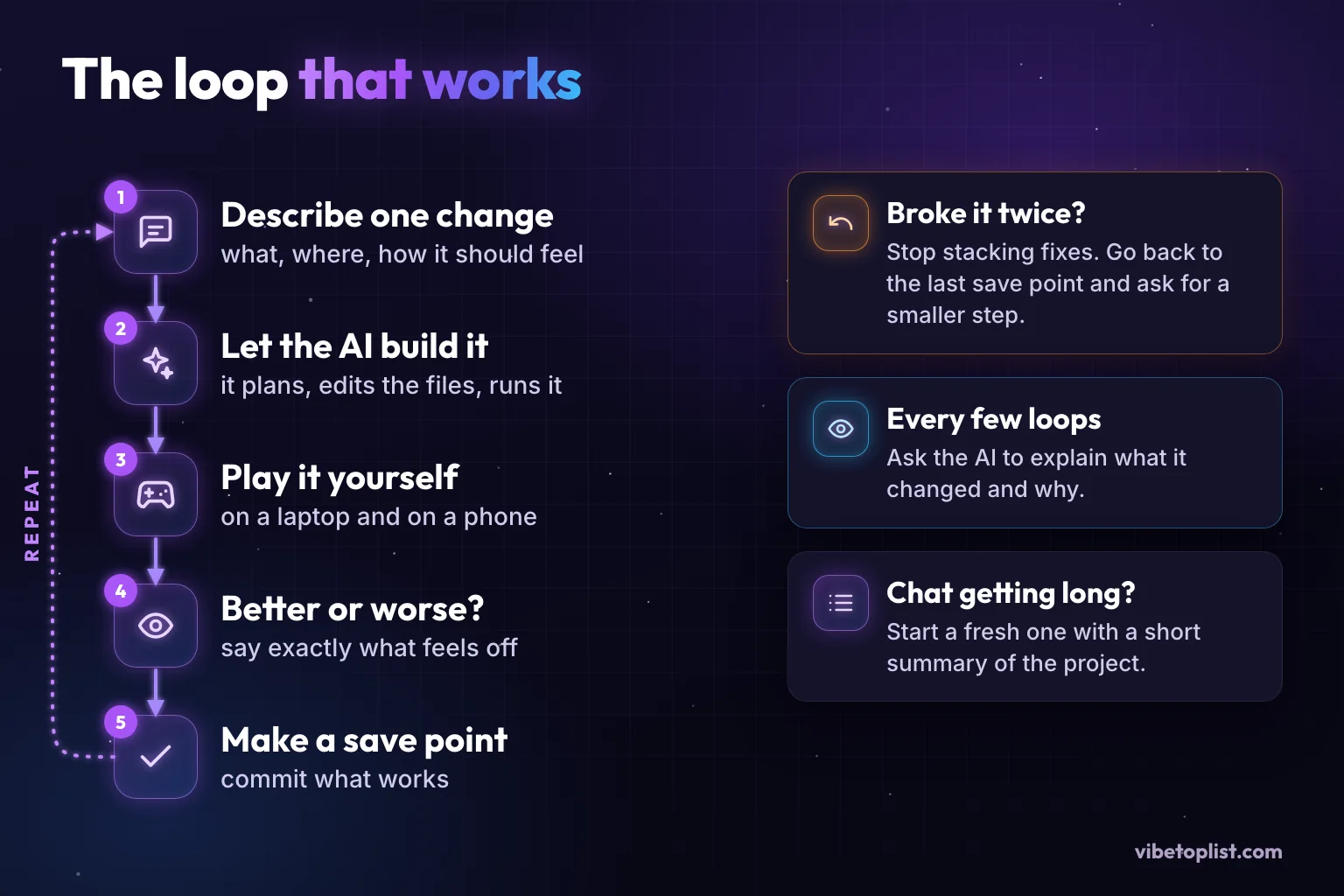
- Describe one change. Not "make the game better", but "make the jump floatier and add a double jump".
- Let the AI build it. For anything that touches several files, ask for a plan first. Claude Code's docs put it simply: "If you could describe the diff in one sentence, skip the plan."
- Play it yourself, on a laptop and on a phone. Better still, give the AI "a check it can run: tests, a build, a screenshot to compare," as Anthropic's guide puts it, so it can catch its own mistakes.
- Judge it. Say exactly what feels off: "the jump is fine now, but landing is too slippery".
- Make a save point as soon as it works.
Three habits keep the loop on track:
- Broke it twice? Roll back. If two fixes in a row fail, go back to your last save point and ask again with a smaller step and the exact error message. Claude Code's guide gives the same advice: after two failed corrections, start fresh with a better prompt.
- Ask for explanations. Every few loops, ask the AI to explain what it changed and why. You will catch problems while they are small, and you will learn how your game works.
- Start fresh when the chat gets long. Long sessions fill the AI's working memory with old attempts. Ask for a short project summary, open a new chat and paste it in.
Step 4: Write prompts that land the first time
A good prompt has five parts. Here is one for a dash move:
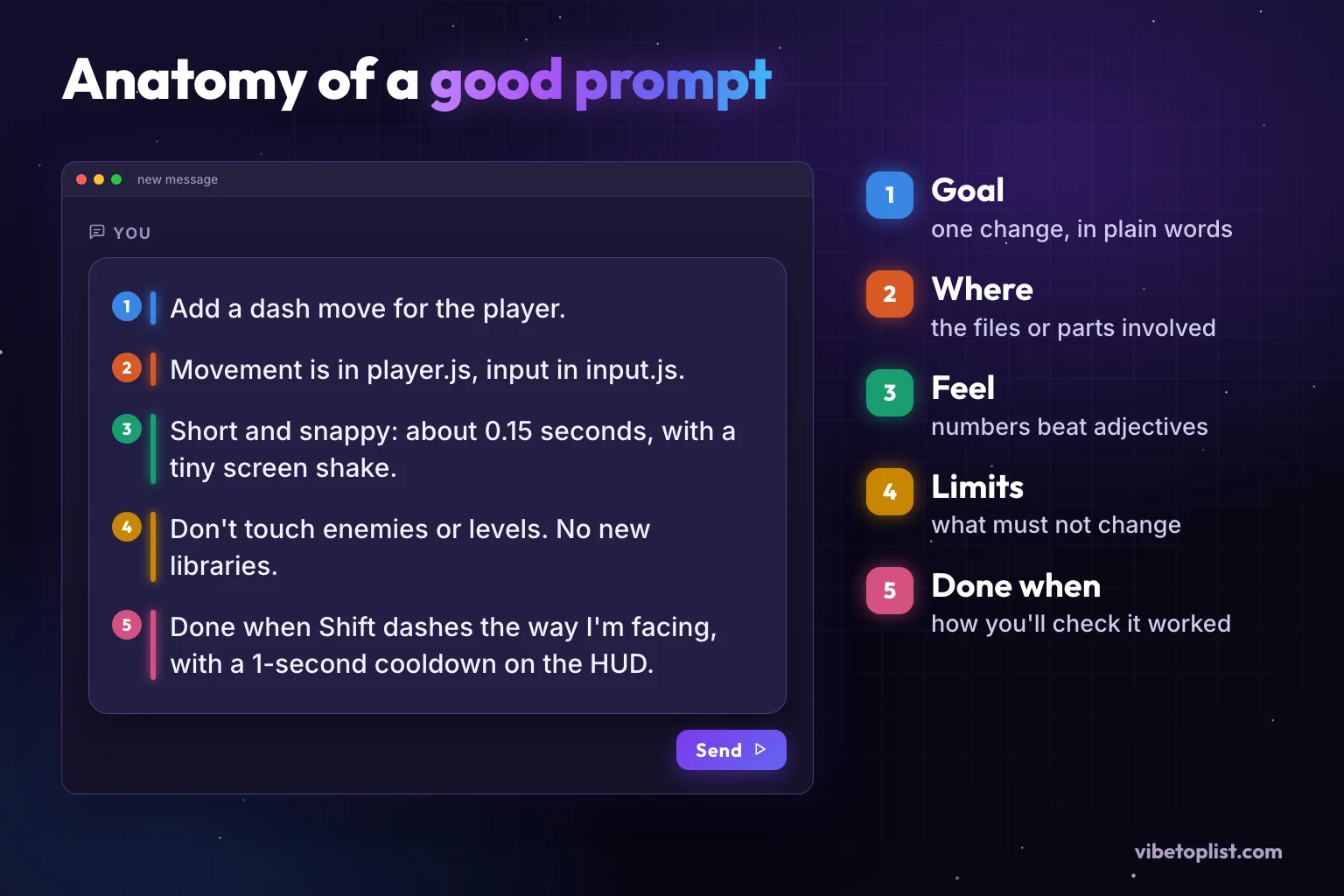
Add a dash move for the player. Movement is in player.js, input in input.js. Short and snappy: about 0.15 seconds, with a tiny screen shake. Don't touch enemies or levels. No new libraries. Done when Shift dashes the way I'm facing, with a 1-second cooldown on the HUD.
- Goal: one change, in plain words.
- Where: the files or parts of the game involved.
- Feel: numbers beat adjectives. "About 0.15 seconds" works better than "fast".
- Limits: what must not change.
- Done when: how you will check that it worked.
When something breaks, report it like a bug, not a mood:
Bug: after a double jump, the player falls through the floating platforms. Expected: they land on them. Steps: jump, jump again in the air, land on a platform. Console error: (paste the exact error). Find the cause before changing anything, then fix only that.
And when you don't understand something, ask before anything changes: "Explain how the jump works now and what you would change. Don't edit any files yet."
Step 5: Add the guardrails your AI won't add for you
AI tools will happily build a working game with an open door. These six checks close the common ones.
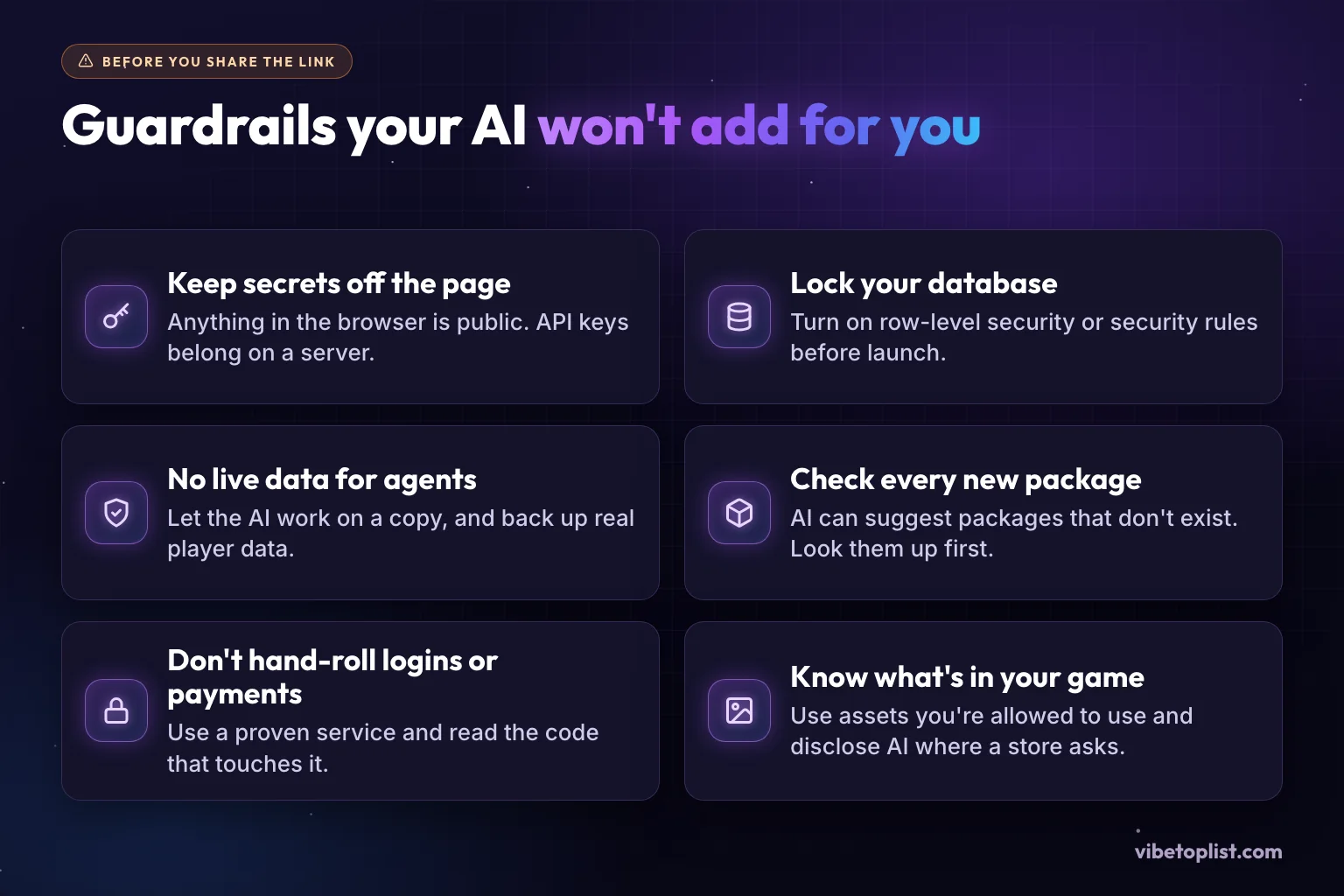
- Keep secrets off the page. Everything a browser game sends to players, including its JavaScript, can be read by anyone. Keys that cost money or open a database belong on a server. When security firm Escape scanned 5,600 apps built on vibe-coding platforms, it found more than 400 exposed secrets.
- Lock your database. If your game saves scores or accounts in Supabase, turn on row-level security: "Enable RLS on every table in an exposed schema." In Firebase, never ship the open test rules; Google's own warning reads "NEVER use this ruleset in production" (Firebase docs). Missing row-level security was behind a 2025 vulnerability in apps built with Lovable (CVE-2025-48757, which Lovable disputes) and behind the Moltbook leak.
- Don't give an agent your live data. Let the AI work on a copy, keep backups and never hand it production passwords. After the database incident, Replit separated development and production databases.
- Check every new package. AI sometimes suggests libraries that don't exist. In a 2025 study of 16 code models, about one in five code samples referenced at least one made-up package, and attackers register such names to catch people who install them. Look a package up before you add it.
- Don't hand-roll logins or payments. Use a proven service, such as Supabase Auth or Stripe Checkout, and read every line of code that touches it, or ask someone who can.
- Know what's in your game. Use art, music and code you are allowed to use, and check each store's AI rules. Steam asks you to disclose AI-made content that players see or hear, such as art, sound and text. itch.io lets you tag AI-generated graphics, sound, text and code (required for asset packs). Poki's guidelines say "AI should empower, not shortcut" and ask for "No AI watermarks or prompt text visible anywhere."
Step 6: Make it playable, not just runnable
- The first 30 seconds: show the controls on screen and let players do something fun right away.
- Phones: add touch controls and test on a real phone, in both orientations if your game allows it.
- Sound: browsers block audio until the player clicks or taps (MDN explains why), so start the music on the first input and add a mute button.
- Saving: for single-player games, saving progress in the browser is usually enough. Ask for it early, because it is annoying to add later.
- Performance: compress images and audio, and test on an older phone.
- Ad blockers: one we learned the hard way while running VibeTopList. Ad blockers can hide images that merely look like ads: AdGuard's default filters hide any image with a classic banner size, such as width="728" height="90", and class names like "ad-card" match common filter lists. Test your game page with an ad blocker switched on.
Step 7: Ship it and find your first players
Where to host
- itch.io hosts browser games for free: upload a zip with an index.html, up to 1,000 files and 500 MB unpacked (limits).
- GitHub Pages and Cloudflare host static games for free. On Cloudflare Workers, "requests to static assets are free and unlimited" (Cloudflare docs).
- Vercel and Netlify work too, but read the free plans: Vercel's Hobby plan is for non-commercial use only, and it counts ads as commercial (fair use guidelines). Netlify's free plan pauses your sites when they go over the monthly limits (billing FAQ).
- Multiplayer on PartyKit? Its hosted platform shuts down on October 23, 2026. Its successor, PartyServer, runs on your own Cloudflare account.
Your launch kit
- A title and a one-line pitch.
- Three or more screenshots and, ideally, a 20 to 30 second trailer or GIF.
- A description of 100 words or more: what it is, how to play, the controls and what's new.
- A link that works on phones, with no login needed to play.
That is the cheapest way to stand out: as our numbers above show, about a third of listed games have no screenshots and two thirds have no trailer. For examples of complete game pages, see Dwarf Breaks Out, Kryptvault and OMNI-CORE.
Where to share it
List it on VibeTopList (free), on itch.io, and in places where people play small games: subreddits and Discord servers for your genre, and game jams like the Vibe Jam. Then keep improving it and post updates: the second post about a game that got better often lands better than the first.
FAQ
Is vibe coding still worth learning in 2026?
Yes. The tools are better than ever, and the skills that matter most (breaking work into small steps, describing what you want precisely and testing what you get) carry over to every tool.
How much coding do I need to know?
None to make a first playable game in a browser builder. To keep a game growing, it helps to read code well enough to follow what changed, and that comes quickly if you ask the AI to explain its changes.
How much does vibe coding cost?
You can start for free: most tools have a free tier. Heavier use typically costs $10 to $30 a month per person (October 2026), and hosting a small browser game can be free.
Do I have to say my game was made with AI?
It depends on where you publish. Steam asks developers to disclose AI-generated content that ships with the game, such as art, sound and text. itch.io offers AI tags for graphics, sound, text and code. On VibeTopList you choose how your game was built when you list it.
Which game framework works best with AI?
Popular ones: plain JavaScript with canvas, Phaser for 2D and Three.js for 3D, because models have seen the most code for them. Godot works too, but Godot 4 projects written in C# can't be exported to the web yet.
The short version
Pick the lane that matches how much code you want to see. Describe one change at a time, play it and save what works. Lock down secrets and data before you share a link. Then give players a real page: screenshots, a short trailer and a clear description. When your game is playable, list it free on VibeTopList so players can find it.
How we made this guide: we wrote it with AI assistance, checked every fact against the sources linked above in October 2026, and drew the game numbers from VibeTopList's own listing data. The illustrations were made for this post.
Built a vibe-coded game?
List it free on VibeTopList | get a permanent game page, organic traffic, and engaged players who actually vote.
+ Submit Your Game